The Short Answer: Place purifiers 3-5 feet from your breathing zone, near pollution sources, with unobstructed airflow. Avoid corners and curtains. For bedrooms, position near the bed but not blowing directly on you.
Editor’s note (September 2026): The Winix 5500-2 has been discontinued and remaining stock is limited. Winix’s official successor is the Winix 5510, which adds app control and uses a new filter. Read our Winix 5510 vs 5500-2 comparison before you buy either one.
The Winix 5500-2 is one of the best-selling air purifiers on the market, praised for its excellent balance of performance and price. But owning a great air purifier is only half the equation, keeping it running at peak efficiency means replacing the filters on a regular schedule. The good news is that you have plenty of options, from official Winix replacement kits to budget-friendly third-party alternatives. The challenge is figuring out which filters are actually worth your money.
In this guide, we break down every replacement filter option for the Winix 5500-2, compare OEM parts against aftermarket competitors, walk you through the replacement process step by step, and answer the most common questions owners have. Whether you have allergies, pets, or just want cleaner indoor air, this guide will help you make the right choice.
Understanding the Winix 5500-2 Filter System
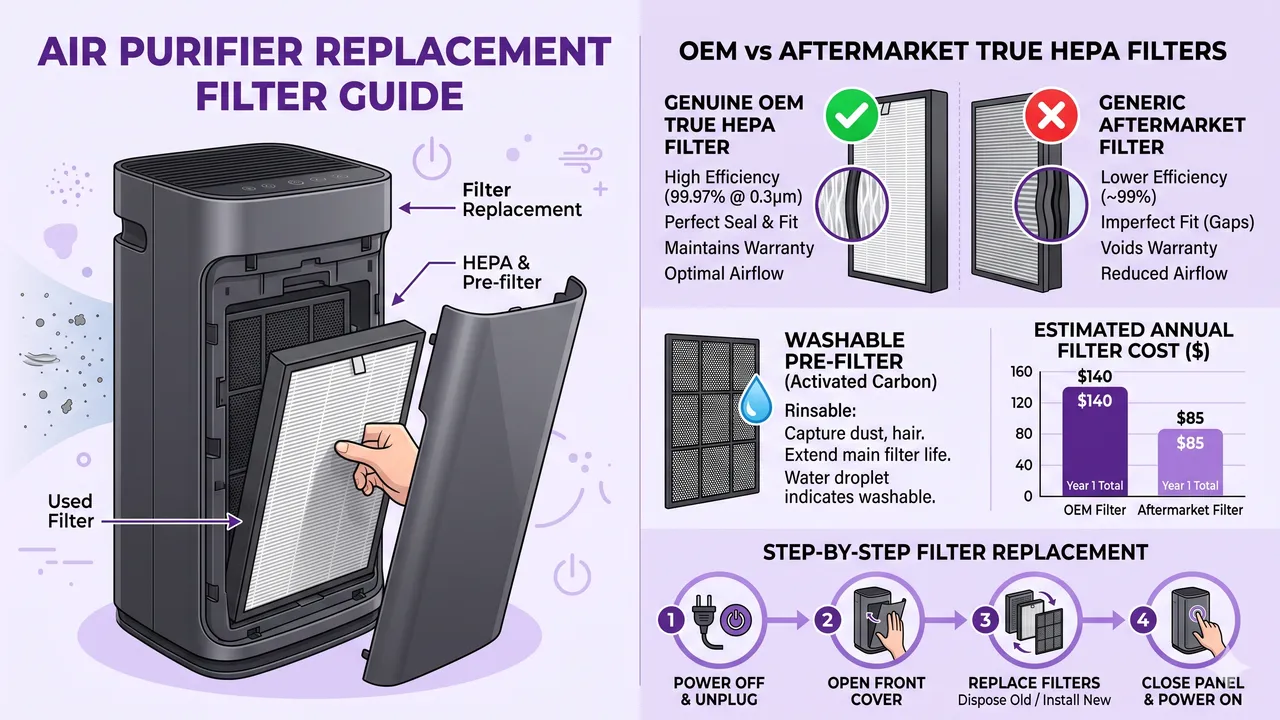
Before you buy replacements, it helps to understand what you are replacing. The Winix 5500-2 uses a three-stage filtration system, plus an optional PlasmaWave technology stage:
- Washable Pre-Filter, Captures large particles like dust, hair, and pet dander. This filter is permanent and only needs to be rinsed every 2–3 months.
- Activated Carbon Filter, A carbon sheet that absorbs odors, VOCs (volatile organic compounds), and household smells. Should be replaced every 3 months.
- True HEPA Filter, Captures 99.97% of airborne particles down to 0.3 microns, including pollen, mold spores, and fine dust. Should be replaced every 12 months.
- PlasmaWave Technology, An optional ionizer that breaks down pollutants at a molecular level. No replacement filter is needed; the PlasmaWave generator lasts the lifetime of the unit.
The carbon filter and HEPA filter are the two consumables you need to budget for. Winix sells them separately or bundled together in what they call “Filter A” or “Filter H” replacement kits.
What is the PlasmaWave Filter?
A common misconception is that the PlasmaWave feature requires its own replacement filter. It does not. PlasmaWave is a bipolar ionization technology built directly into the Winix 5500-2. It generates positive and negative ions that attach to airborne pollutants, breaking them into harmless water vapor and trace amounts of carbon dioxide. There is no cartridge or media to swap out. If the PlasmaWave indicator on your unit lights up or if you notice the feature seems less effective over time, the issue is almost always related to dirty pre-filters or HEPA saturation, not a failed PlasmaWave module.
That said, some owners choose to leave PlasmaWave off, particularly those sensitive to ozone. While Winix states that PlasmaWave produces negligible ozone levels (well below FDA limits for medical devices), if you or someone in your household has respiratory sensitivities, you can disable it with the button on the control panel without affecting the HEPA or carbon filtration stages.
Replacement Filter Options for the Winix 5500-2
There are two categories of replacement filters available: OEM (Original Equipment Manufacturer) filters made by Winix, and third-party or aftermarket filters made by other companies. Both can deliver excellent air cleaning performance, but they differ in price, fit, filtration quality, and warranty implications.
OEM Winix Replacement Filters
Winix sells the following official replacement parts for the 5500-2:
- Winix 115115 Replacement Filter A, Contains one True HEPA filter and one activated carbon sheet. This is the standard annual replacement set.
- Winix 116130 Replacement Filter Kit, Includes one True HEPA filter and four activated carbon sheets, giving you a full year of carbon filter replacements plus the HEPA.
- Winix 115116 Replacement Filter H, A standalone True HEPA filter without carbon sheets.
- Winix 114190 Carbon Sheets (4-Pack), Replacement carbon filters sold separately.
OEM filters are guaranteed to fit perfectly and maintain the manufacturer’s stated filtration specifications. If your Winix 5500-2 is still under warranty, using official filters ensures you stay compliant with the warranty terms.
Third-Party / Aftermarket Replacement Filters
Several reputable companies make compatible filters for the Winix 5500-2 at a lower price point:
- KOONIE Compatible Filter Set, Includes HEPA and carbon filters. Typically priced around $20–$25 for a complete set.
- Dreecor Compatible Filter Set, Another popular budget option with similar filtration ratings.
- HEPA-Flow Compatible Filters, A mid-range aftermarket option that emphasizes tighter pleats on the HEPA media.
- X-Filter Replacement Set, A newer entrant that uses activated carbon pellets instead of a carbon sheet for enhanced odor absorption.
Third-party filters have improved dramatically in recent years. Many now use True HEPA media rated at H13 grade (the same grade as the OEM filter) and include carbon filters that are comparable in thickness and carbon weight. The primary risk with aftermarket filters is inconsistent quality control, one batch may perform slightly differently than the next.
OEM vs Third-Party Filters: Detailed Comparison
The table below breaks down the key differences between OEM Winix filters and popular third-party alternatives:
| Feature | OEM Winix Filter (115115) | KOONIE Aftermarket | Dreecor Aftermarket | X-Filter Aftermarket |
|---|---|---|---|---|
| HEPA Grade | True HEPA (H13) | True HEPA (H13) | True HEPA (H13) | True HEPA (H13) |
| Particle Capture (0.3µ) | 99.97% | 99.97% (claimed) | 99.95% (claimed) | 99.97% (claimed) |
| Carbon Filter Type | Activated carbon sheet | Activated carbon sheet | Activated carbon sheet | Carbon pellets + sheet |
| Number of Carbon Sheets | 1 (or 4 in 116130 kit) | 1 | 1 | 1 |
| Fit / Compatibility | Perfect OEM fit | Very good; minor gaps | Good; occasional tight fit | Good; tight fit |
| Price (approx.) | $49–$59 | $20–$25 | $18–$22 | $25–$30 |
| Annual Cost (est.) | $59–$108 | $40–$50 | $36–$44 | $50–$60 |
| Warranty Safe | Yes | No (may void warranty) | No (may void warranty) | No (may void warranty) |
| Odor Performance | Good | Moderate | Moderate | Very Good |
| Lifespan | 12 months HEPA / 3 months carbon | 10–12 months / 3 months | 8–12 months / 2–3 months | 10–12 months / 3 months |
| Build Quality Consistency | High | Moderate | Moderate | Moderate–High |
When to Choose OEM Filters
- Your Winix 5500-2 is still under the manufacturer’s warranty and you want to maintain coverage.
- You need guaranteed, consistent filtration performance for medical reasons (asthma, severe allergies).
- You prefer the peace of mind that comes with a perfect fit every time.
- You don’t mind paying a premium for quality assurance.
When Third-Party Filters Make Sense
- You want to save 40–60% on replacement costs over the life of the unit.
- Your warranty has already expired.
- You have mild allergies or general air quality concerns rather than severe respiratory conditions.
- You are replacing filters frequently (e.g., in a home with heavy pet dander or wildfire smoke exposure) and the costs add up quickly.
Step-by-Step: How to Replace the Winix 5500-2 Filters
Replacing the filters on the Winix 5500-2 is straightforward and takes about five minutes. Follow these steps:
What You Will Need
- One replacement True HEPA filter (OEM or third-party)
- One replacement activated carbon filter (or new carbon sheet)
- A vacuum with a brush attachment (optional, for cleaning the pre-filter)
- Access to a sink or bathtub
Replacement Steps
Step 1: Turn Off and Unplug the Unit Always disconnect the Winix 5500-2 from power before performing any maintenance. This protects you from electric shock and prevents the fan from activating while the filters are removed.
Step 2: Remove the Front Cover The front panel of the Winix 5500-2 is held on by magnets. Gently pull it straight toward you and set it aside.
Step 3: Remove the Old Filters Slide out the carbon filter first, it sits directly in front of the HEPA filter. Then slide out the old HEPA filter. Note the orientation: there is typically a small tab or arrow indicating which side faces outward.
Step 4: Clean the Pre-Filter The washable pre-filter is built into the back of the front panel. Remove it if your model allows (some snap out), rinse it under warm water, and let it air dry completely before reinstalling. Do not use soap or cleaning chemicals, as residue can off-gas when the unit runs. Alternatively, vacuum it with a brush attachment.
Step 5: Install the New HEPA Filter Unwrap the new HEPA filter from its packaging. Slide it into the unit with the correct orientation, the side with the gasket or rubber seal should face the unit’s interior to prevent air bypass. Push it firmly into place until it sits flush.
Step 6: Install the New Carbon Filter Place the new activated carbon filter (or carbon sheet) in front of the HEPA filter. It should sit flat and cover the entire face of the HEPA filter.
Step 7: Replace the Front Cover Reattach the front panel. The magnets will snap it into place.
Step 8: Reset the Filter Indicator After powering the unit back on, you need to reset the filter change indicator. Press and hold the Filter Reset button (located on the control panel, usually near the timer button) for about 5 seconds until the indicator light turns off. This tells the unit to begin counting down to the next replacement cycle.
Step 9: Run the Unit Turn the purifier back on and let it run on high speed for 15–30 minutes to activate the new filter media. You may notice a slight “new filter” smell, this is normal and dissipates quickly.
Tips for Extending Filter Life
- Vacuum the pre-filter monthly. This reduces the load on the HEPA filter and can extend its life by several months.
- Run on lower speeds when possible. Lower fan speeds push less air through the filter, resulting in slower particle accumulation.
- Keep doors and windows closed in the room where the purifier operates. This reduces the influx of outdoor pollutants and helps the filter last longer.
- Track your replacement dates. Use a calendar reminder or a simple note on the unit. Replacing filters on time ensures you never breathe degraded air.
How Often Should You Replace the Filters?
Winix provides the following general guidelines:
| Filter | Recommended Replacement Interval |
|---|---|
| Washable Pre-Filter | Never (rinse every 2–3 months) |
| Activated Carbon Filter | Every 3 months |
| True HEPA Filter | Every 12 months |
| PlasmaWave Module | Never (built-in, lifetime) |
These intervals may shorten depending on your environment:
- Homes with pets: Replace the carbon filter every 2 months and consider replacing the HEPA filter every 8–10 months.
- Wildfire smoke areas: Replace carbon filters monthly during smoke season and replace the HEPA filter every 6–8 months.
- Construction zones or high-dust environments: Vacuum the pre-filter weekly and replace the HEPA filter every 6–9 months.
- Homes with smokers: Replace the carbon filter monthly for odor control.
Cost Comparison: Yearly Filter Expenses
Here is a realistic cost breakdown for one year of operation with different filter brands:
- OEM Winix (116130 kit): ~$59 for one HEPA + four carbon sheets = $59/year
- OEM Winix (115115 × 2 + carbon packs): ~$98–$108/year
- KOONIE Set × 2: ~$40–$50/year
- Dreecor Set × 2: ~$36–$44/year
- X-Filter Set × 2: ~$50–$60/year
Over a typical 5-year lifespan of the Winix 5500-2, using third-party filters can save you $100–$300 compared to OEM replacements. That said, if air quality is critical for health reasons, the additional cost of OEM filters is a worthwhile investment.
Where to Buy Replacement Filters
You can purchase Winix replacement filters from several sources:
- Amazon, Widest selection of both OEM and third-party options, with fast shipping and easy returns. Our recommended links throughout this article all point to Amazon listings.
- Winix Official Website, Best for guaranteed OEM parts, though prices are often slightly higher than Amazon.
- Home Depot / Lowe’s, Some stores carry Winix filters in stock, which is convenient if you need a replacement immediately.
- Walmart, Occasionally carries Winix-compatible filters both in-store and online.
We recommend checking our air purifier buying guide for tips on where to find the best deals on replacement filters and accessories.
Frequently Asked Questions
1. Can I use non-Winix filters in my 5500-2 without voiding the warranty?
Technically, the Winix warranty states that using non-OEM accessories may void coverage. In practice, third-party filters that fit correctly and do not damage the unit are unlikely to cause warranty issues unless a specific failure can be directly attributed to the aftermarket filter. If your unit is still under warranty and you want to play it safe, stick with official Winix filters.
2. Is the PlasmaWave feature safe? Does it produce ozone?
Winix states that PlasmaWave produces ozone levels below 0.05 ppm, which is well within the FDA’s limit for medical devices (0.05 ppm) and far below the OSHA workplace limit of 0.1 ppm. Independent testing has generally confirmed these claims. However, if you have extreme ozone sensitivity or a severe respiratory condition, you can disable PlasmaWave and still get excellent HEPA and carbon filtration from the unit. For more details on air purifier safety, see our guide on air purifier safety for pet birds.
3. How do I know when to replace the filters?
The Winix 5500-2 has a built-in filter change indicator light on the control panel. It illuminates when the unit estimates that the filter has reached the end of its useful life. This is based on a timer, not an actual sensor reading the filter’s condition. If you run your purifier on high speed 24/7, you may need to replace filters sooner than the indicator suggests. A visual inspection is also helpful, if the HEPA filter looks dark gray or discolored, it is time to replace it regardless of what the indicator says.
4. Can I wash and reuse the HEPA or carbon filters?
No. The True HEPA filter cannot be washed, water destroys the delicate fiber structure that traps particles. Washing a HEPA filter will render it completely ineffective. The activated carbon filter should also not be washed, as water saturates the carbon pores and eliminates its ability to absorb odors and chemicals. Only the washable pre-filter (the mesh screen built into the front panel) can be rinsed with water.
5. Are there any filters I should avoid?
Be cautious of filters that do not clearly state “True HEPA” or “H13” on the packaging. Some budget filters use “HEPA-type” or “HEPA-like” media, which is a marketing term with no standardized definition. These filters may only capture 85–95% of particles at 0.3 microns, compared to 99.97% for True HEPA. Also avoid filters that claim to last more than 12 months, the HEPA media has a finite capacity, and overextending its use means your air purifier is pushing air through a saturated, ineffective filter.
Final Recommendation
For most Winix 5500-2 owners, we recommend the Winix 116130 True HEPA Replacement Filter Kit as the best overall value. It includes one HEPA filter and four carbon sheets, enough to cover a full year of operation at a reasonable price. If you are on a tight budget and your warranty has expired, the KOONIE compatible filter set delivers solid performance at roughly half the cost.
Whatever you choose, the most important thing is to replace your filters on time. A dirty filter is not just ineffective, it can actually degrade your indoor air quality by becoming a breeding ground for bacteria and mold. Set a reminder, check your filter indicator, and keep your Winix 5500-2 running the way it was designed to.
For more air purifier tips and in-depth reviews, explore our complete air purifier buying guide and learn about the common buying mistakes that waste money.
Disclosure: This article contains affiliate links. If you purchase through these links, we may earn a small commission at no additional cost to you. This helps support our mission to provide honest, research-backed air quality guides. As an Amazon Associate, we earn from qualifying purchases.
You May Also Like
Support This Guide
Helpful? Add The Air Purifier Guide as a preferred source on Google so our guides show up in your search results.
Related Articles

Coway Mighty2 vs AP-1512HH (2026)
Coway's Mighty2 replaced the AP-1512HH as Wirecutter's top pick. We compare CADR, noise, sensors, filter costs, and whether the older unit is still the smarter buy.

KNKA APH4000 Review: $150 Dark Horse
KNKA's APH4000 is one of Amazon's best-selling purifiers at $150. We check the AHAM certification, decode the 1,695 sq ft claim, and compare it to Levoit and Coway.

Levoit Core 300 vs 300-P: What Changed
Levoit quietly replaced the Core 300 with the Core 300-P. We explain the AHAM certification, whether filters still fit, and which one you should actually buy.

Shark NeverChange HP302 Review
Shark's NeverChange HP302 promises 5 years on one filter. We dig into the real running costs, the odor neutralizer catch, and whether it beats cheaper rivals.

Winix 5510 vs 5500-2: 2026 Verdict
The Winix 5500-2 is discontinued and the 5510 takes over. We compare CADR, noise, filter costs, and the one compatibility problem nobody mentions.
🛒 Products Mentioned
As an Amazon Associate, we earn from qualifying purchases.
Runs side-by-side purifier comparisons, long-term ownership reports, and filter cost analysis.
View all articles by David →